 SmartScroll
The short answer: pick by mechanism, not marketing. If your scrolling is a strong reflex that has already beaten timers and blockers, you need an app that interrupts and redirects the craving (SmartScroll). If you need airtight deep-work sessions, use a hard blocker (Opal, Freedom). If your habit is mild, friction (one sec, ScreenZen) may be enough. If you're motivated by streaks, gamification (Forest) works.
Quick comparison
| App | Mechanism | Price | Best for | Weak spot |
|---|---|---|---|---|
| SmartScroll | Interrupts the loop at your limit, replaces the feed with knowledge cards; Life Grid shows time lost as life lost | Premium via in-app purchase | People whose doomscroll reflex has beaten blockers and willpower | iOS only; newer app with a smaller user base |
| Opal | Hard blocking in scheduled focus sessions | Free tier; premium around $99/year | Airtight deep-work hours | Users report disabling it evenings/weekends, exactly when doomscrolling happens |
| one sec | Breathing pause before a blocked app opens | Free for one app; subscription for more | Mild habits; science-minded users (peer-reviewed studies) | A strong craving treats the pause as a loading screen; no replacement behavior |
| ScreenZen | Pause + intention prompts before opening | Free | Trying friction at zero cost | Same friction-only limits as one sec |
| Freedom | Synced blocking across phone and computer | Subscription | Scrolling that hops between phone and laptop | Wall model: bypass pressure at the moment of craving |
| Forest | Gamified focus timer (grow a tree, don't touch the phone) | Paid app | Streak- and reward-motivated users | Doesn't intervene inside the feed moment at all |
1. SmartScroll: for when blockers keep getting bypassed
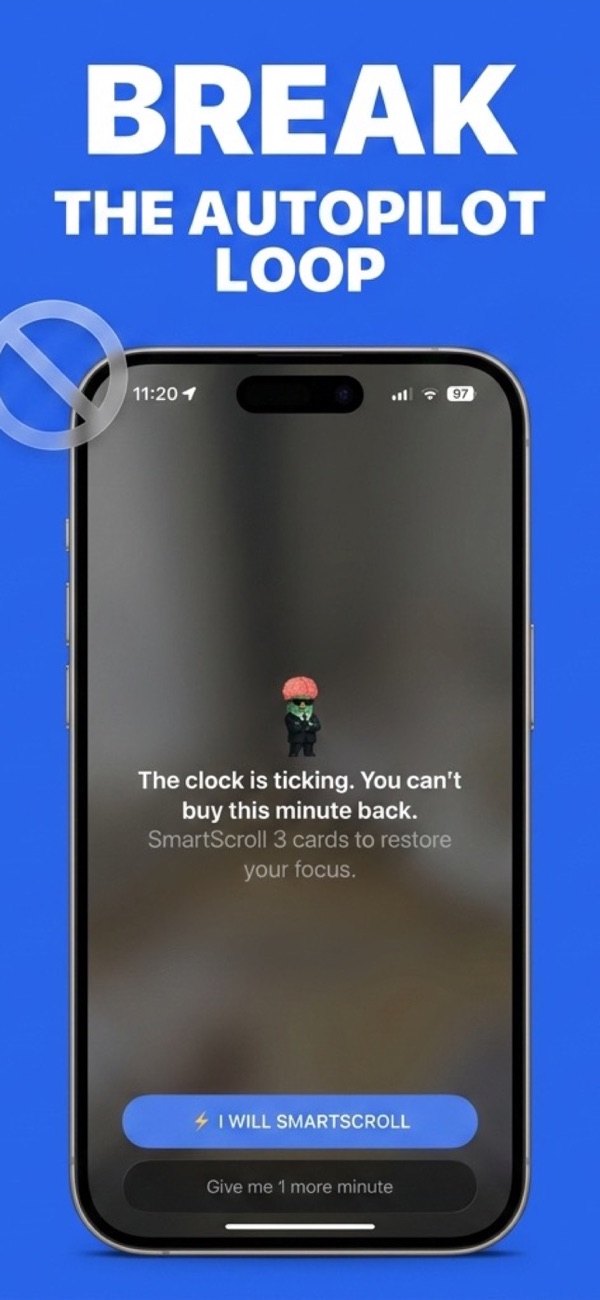
Mechanism: you set daily limits and schedules for TikTok, Instagram, YouTube, X or any endless feed. When the limit hits, SmartScroll doesn't show a lock screen: it interrupts the scrolling momentum ("The clock is ticking. You can't buy this minute back.") and offers bite-sized knowledge cards instead. The swiping reflex gets a healthy outlet rather than a wall, which is why the redirect holds where hard blocks get disabled. The Life Grid then shows your scrolling measured in years of remaining life.
Price: Premium via in-app purchase. Platform: iPhone and iPad (iOS 17.6+). Rating: 4.8★ on the US App Store.
Honest weak spots: it's iOS-only and newer than the incumbents, and the interruption deliberately leaves you a conscious "one more minute" choice, it's a redirect, not a prison. If you want a literal unbreakable wall for work hours, pair it with a hard blocker.
2. Opal: for airtight deep-work sessions
Opal's scheduled Focus Sessions make selected apps genuinely inaccessible, and for protecting work hours it's excellent. The two caveats reported most often: the premium price (around $99/year) and the pattern where users keep it strict 9-to-5 but disable it in the evenings, which is when most doomscrolling actually happens. If your problem is work-hours distraction, Opal fits. If your problem is the 11 p.m. Reels spiral, a wall you can switch off won't survive it; see why app blockers don't work.
3. one sec: for mild habits, with real science behind it
one sec inserts a breathing exercise before a blocked app opens, and it's backed by peer-reviewed research with the Max Planck Institute: genuine credit for that. The friction measurably reduces impulsive opens. Its limit is structural: a delay reduces entries into the feed but offers nothing at the moment your limit-of-tolerance is reached inside a session, and a strong craving simply waits out the pause. Free covers one app; more requires a subscription.
4. ScreenZen: the best free starting point
ScreenZen offers pause screens and intention prompts at no cost. If you've never tried any intervention, start here: it's free and it works for light habits. If you've already out-clicked pause screens, you need either a harder wall (Opal) or a redirect (SmartScroll).
5. Freedom: for phone-and-laptop scrollers
Freedom's distinctive feature is synced blocking sessions across all your devices. If your doomscrolling migrates from phone to browser tabs, it closes that loophole. It's still a wall-model blocker, with the bypass pressure that comes with walls.
6. Forest: for streak-lovers
Forest gamifies not touching your phone: start a session, grow a tree, kill it by leaving. It's charming and effective for planned focus blocks. It does nothing at the unplanned moment: when you're already 20 minutes deep in Shorts, there's no tree to save you.
The verdict
- Doomscroll reflex that survives every blocker → SmartScroll. The interrupt-and-redirect mechanism is the only one on this list that gives the craving somewhere to go.
- Deep work protection → Opal or Freedom.
- Mild habit, zero budget → ScreenZen first, one sec if you want the research pedigree.
- Motivation by streaks → Forest, alongside one of the above.
Combinations are legitimate: several of these solve different problems. But if you're here because "one more video" keeps beating your limits, start with the app built for exactly that moment.
Try the interrupt-and-redirect approach
Download SmartScroll and set your first limit in two minutes.