 SmartScroll
The short answer: to stop doomscrolling, you have to interrupt the loop at the moment of craving, not before, not after. Feeds like TikTok, Reels and Shorts use variable rewards (the same mechanism as slot machines) to keep you swiping, which is why "I'll just be more disciplined" fails almost every time. What works is changing the environment: limits, friction, and a replacement behavior ready at the exact second your thumb wants one more swipe.
Why you can't just "stop" doomscrolling
Doomscrolling isn't a character flaw. Every endless feed is engineered around three hooks: infinite scroll (no natural stopping point), autoplay (the next video starts before you decide), and variable rewards (the next swipe might be amazing, so your brain keeps pulling the lever). A 2025 review of 71 studies covering nearly 100,000 people linked heavy short-form video use with weaker attention and impulse control and higher stress and anxiety. You're not fighting a bad habit: you're fighting a product team.
10 tactics that actually work
- Set hard daily limits on your worst apps. Not aspirational ones: real ones. If TikTok gets 2 hours a day now, set 45 minutes, not 5.
- Interrupt at the moment of craving. The decisive second is when the limit hits and your brain screams "one more." A blocker that just locks you out gets disabled. An interruption that redirects you has a chance.
- Give your thumb a replacement behavior. The scrolling reflex won't vanish, so point it at something. SmartScroll swaps the feed for quick knowledge cards: you still scroll, but you learn something instead.
- Make wasted time visible. Abstract "screen time" numbers don't motivate. Seeing years of your life marked as lost, like SmartScroll's Life Grid, does.
- Schedule feed-free hours. Mornings before work and the hour before bed are prime doomscroll windows. Block them by default, not by decision.
- Move the apps off your home screen. Every tap of friction between the impulse and the feed helps.
- Kill autoplay and non-human notifications. Only real people should be able to buzz your pocket.
- Retrain your attention span. Reintroduce podcasts, articles and long-form video so your brain relearns delayed payoff.
- Never scroll in bed. Charge your phone across the room; use a real alarm clock.
- Track streaks, not perfection. One relapse doesn't erase progress. What matters is the trend of reclaimed hours.
How SmartScroll runs this playbook for you
You could enforce all ten tactics manually, or install one app that does the heavy lifting:
- Custom limits and schedules handle tactics 1 and 5: pick TikTok, Instagram, YouTube, X or any endless feed and set daily caps and protected hours.
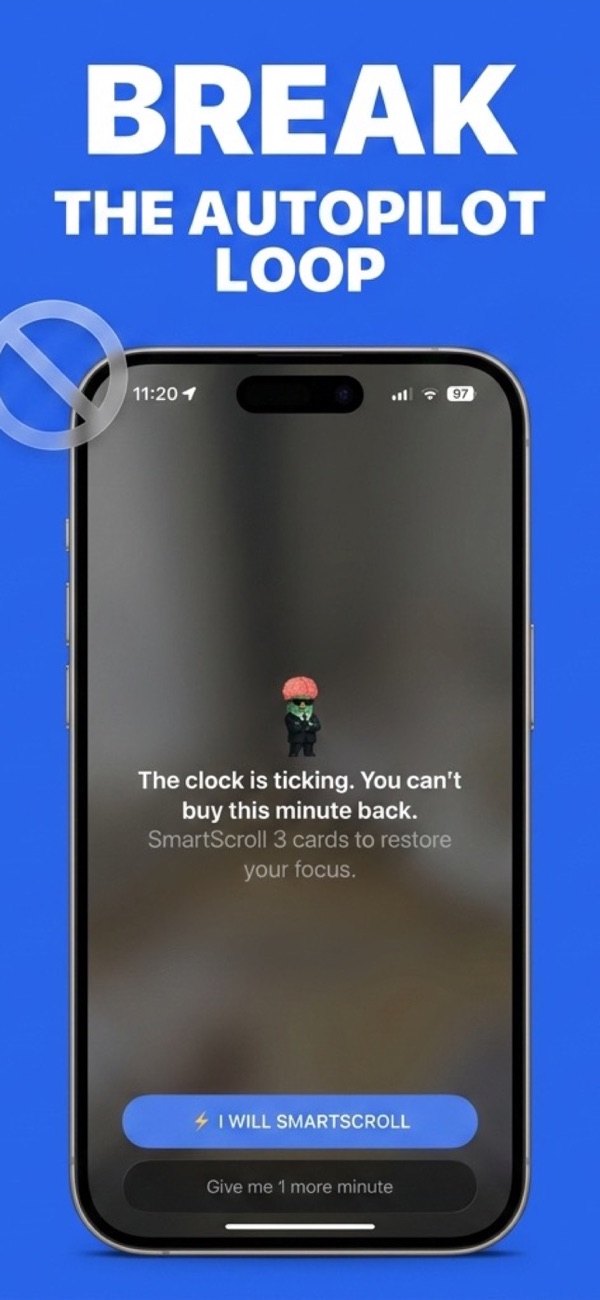
- The smart interruption flow handles tactic 2: when your limit is reached, SmartScroll breaks the scrolling momentum with a full-stop moment. "The clock is ticking. You can't buy this minute back.": instead of a silent, ignorable banner.
- Knowledge cards handle tactic 3: your thumb keeps scrolling, but through bite-sized facts and insights you'll actually remember.
- The Life Grid handles tactic 4: it converts your screen time into a grid of your remaining life, so "6 years lost forever" stops being abstract.
Why this beats a plain blocker: when a hard blocker locks you out mid-craving, you disable it, everyone does, eventually. SmartScroll redirects the craving instead of walling it off, which is why the habit change sticks. More on this in Why App Blockers Don't Work.
What to expect in the first week
Days 1–2 feel twitchy: you'll open blocked apps on reflex and meet the interruption a lot. That's the system working: each interruption is a doomscroll session that didn't happen. By day 4–5 most people notice the reflex weakening, and the Life Grid starts showing green: hours that used to vanish into the feed, back in your day. Keep social media installed the whole time: the goal is breaking the loop, not going off-grid.
Stop doomscrolling tonight
Set your first limit in under two minutes.