 SmartScroll
The short answer: app blockers fail because they put a wall in front of a craving without giving the craving anywhere to go. A craving plus a Disable button equals a bypass: every time, eventually. What works is interruption plus replacement: break the scrolling trance at the moment of craving, then hand the urge a substitute behavior. That's the model SmartScroll is built on, and it's why people who've churned through three blockers finally stick with it.
The bypass problem, in one sentence
Every blocker you install, you can uninstall, and the moment of maximum craving is the moment you'll remember that.
Run through the graveyard of tools you've probably tried:
- Apple Screen Time: the limit arrives with "Remind Me in 15 Minutes" and "Ignore Limit for Today" attached. iOS itself hands you the escape hatch.
- Hard blockers (Opal, Freedom): genuinely strict during work hours, which is why users report disabling them evenings and weekends, exactly when doomscrolling happens. A $99/year wall you turn off is an expensive decoration.
- Friction apps (one sec, ScreenZen): a breathing exercise before the app opens helps with mild habits, but a strong craving treats a 10-second delay as a loading screen.
- Deleting the apps: works until the reinstall, and the rebound binge that follows.
None of these tools are stupid. They all share one blind spot: they treat the moment of craving as the moment to say no, when it's actually the moment your brain is least capable of accepting a no.
What the wall gets wrong about your brain
The scrolling urge is a trained reflex with momentum: thumb moving, dopamine loop primed, next reward expected. A wall doesn't discharge that momentum; it dams it. The pressure has to go somewhere, so it goes into bypassing: tapping Ignore, opening the browser version, or uninstalling the blocker "just for tonight." Habit research is consistent on this: you don't erase a behavior, you replace it. A blocker that offers no replacement is asking the reflex to simply cease existing. It won't.
What works: interrupt, then redirect
SmartScroll handles the craving moment in two moves instead of one:
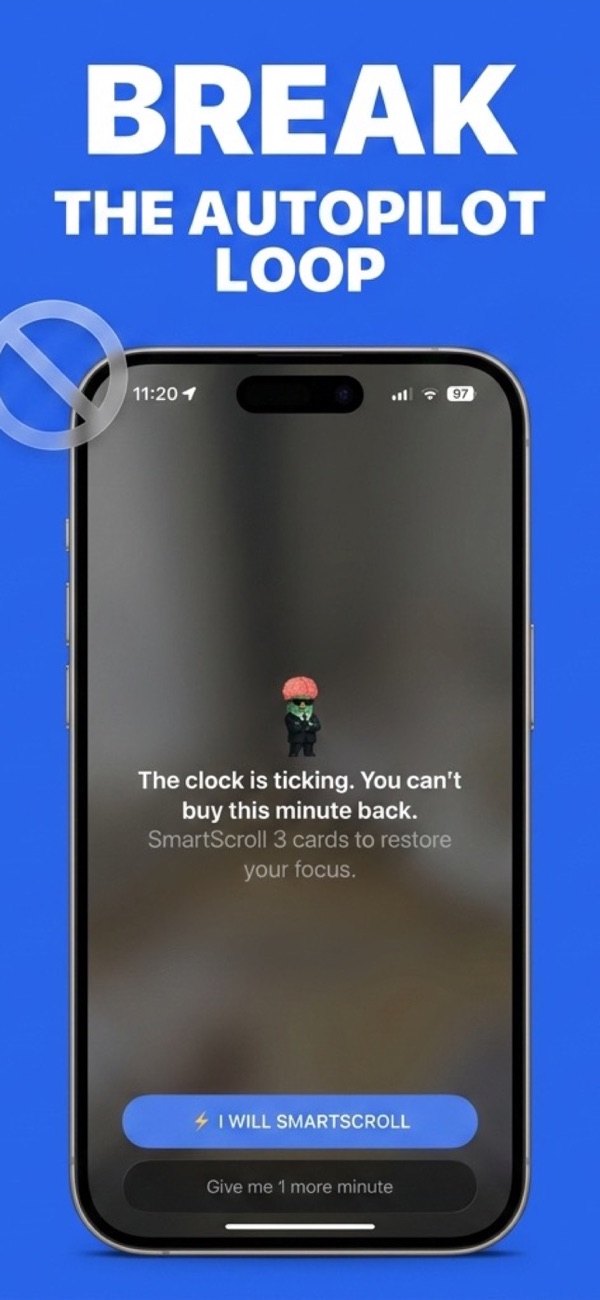
- Interrupt the trance. When your daily limit hits on TikTok, Reels, Shorts or X, SmartScroll breaks the autopilot with a full-stop moment: "The clock is ticking. You can't buy this minute back." Not a banner you swipe away: a genuine break in the loop's momentum.
- Redirect the reflex. Instead of a locked door, you get a choice: scroll three quick knowledge cards, or consciously take one more minute. The scrolling urge gets an outlet: same thumb motion, but through bite-sized facts you'll remember. The momentum discharges into the redirect instead of into a bypass.
Two more pieces make the redirect durable:
- The stakes stay visible. The Life Grid converts your scrolling into years of remaining life, so the reason you set the limit is in front of you at the moment you're tempted to break it. Walls hide the why; SmartScroll shows it.
- The apps stay installed. No deprivation cycle, no rebound binge. Intentional use fits inside your limit; only the autopilot loop meets the interruption. See blocking TikTok without deleting it for the setup.
The honest caveat: SmartScroll leaves you a conscious choice. "Give me 1 more minute" is right there on the screen. That's not a weakness; it's the mechanism. Making the scroll a decision instead of a reflex is the entire game. Reflexes run for hours; decisions last a minute.
If you've failed with blockers before
You're the exact person this approach was designed for. Blocker veterans usually discover their doomscrolling was never a discipline problem: it was an architecture problem: wrong intervention, wrong moment, no replacement. Change the architecture and the same "weak-willed" person quits the loop in a week. Start with the full stop-doomscrolling playbook, or just set your first limit and let the interruption prove itself tonight.
Trade the wall for a redirect
Download SmartScroll: built for people who've out-clicked every blocker.