 SmartScroll
The short answer: ScreenZen and SmartScroll sit at different stages of the same problem. ScreenZen adds pause screens and intention prompts before an app opens, free, and it works well for light habits. SmartScroll intervenes deeper in the loop: when your daily limit is reached mid-session, it interrupts the scrolling momentum and replaces the feed with knowledge cards. If you've started tapping through ScreenZen's pauses on autopilot, you don't need a longer pause. You need a replacement.
Side-by-side
| SmartScroll | ScreenZen | |
|---|---|---|
| Intervention moment | At your daily limit, mid-session, at the craving peak | Before the app opens |
| Mechanism | Interrupt the loop, redirect the swipe into knowledge cards | Pause screen + intention prompt |
| What the urge gets | A replacement behavior (scroll, but learn) | A delay and a question |
| Price | Premium via in-app purchase | Free |
| Motivation layer | Life Grid: screen time shown as years of remaining life | Streaks and opens-prevented stats |
| Best for | Entrenched doomscroll habits that have outlasted friction | Light habits, first-time intervention, zero budget |
| Weak spot | Leaves a conscious "1 more minute" choice (by design) | Pauses habituate; heavy scrollers tap through on autopilot |
Where ScreenZen genuinely wins
Full credit: ScreenZen is free, well built, and the right first tool. If you've never put any intervention between yourself and your feeds, start there; it costs nothing and light habits often need nothing more. Its streak system is motivating, and the intention prompts ("why are you opening this?") teach a genuinely useful reflex of noticing the impulse.
Where pause screens run out
Friction tools share a ceiling, and it arrives faster the heavier the habit:
- Pauses habituate. The twentieth pause screen isn't a moment of reflection; it's a loading bar. Your thumb learns the dismissal gesture and executes it below consciousness.
- The session is unguarded. Pause screens guard the door. Once you're in, the 40-minute Reels spiral happens entirely on the far side of the intervention.
- The urge gets nothing. A question and a delay ask the scrolling reflex to evaporate. Reflexes don't evaporate; they get replaced or they win. The mechanics are in why app blockers don't work.
What SmartScroll does differently
SmartScroll assumes the reflex will outlive any prompt, and re-aims it instead. You set daily limits and schedules for TikTok, Instagram, YouTube, X or any endless feed. When the limit hits, mid-session, SmartScroll breaks the momentum ("The clock is ticking. You can't buy this minute back.") and offers bite-sized knowledge cards: the same swipe, pointed at something you'll remember. The Life Grid then keeps the stakes visible by converting the habit into years of remaining life. In one line: ScreenZen asks if you're sure. SmartScroll gives your thumb a better job.
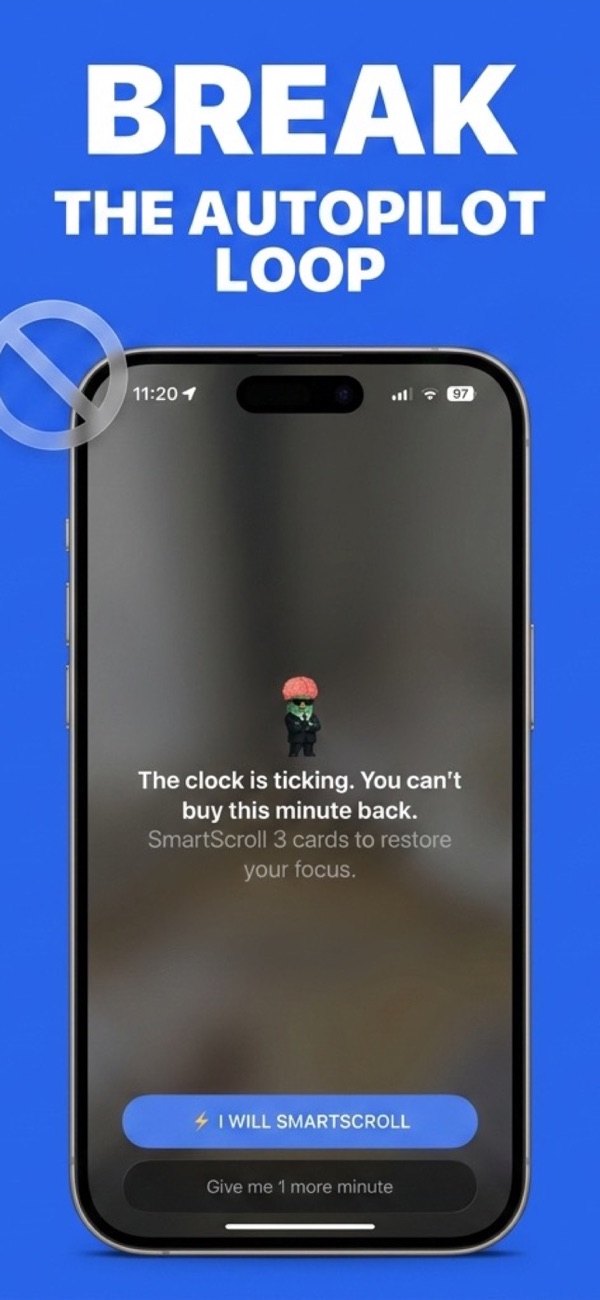
They stack well: ScreenZen's prompt at the door, SmartScroll's interruption inside the session. If you run only one, pick by where your habit actually beats you: at the open, or twenty minutes in.
Which should you pick?
- Pick ScreenZen if this is your first intervention, your sessions are short, and a pause still genuinely stops you.
- Pick SmartScroll if you tap through pauses on autopilot, your sessions run long once you're in, or you want the cost of the habit made visible instead of just counted.
When the pause stops pausing you
Download SmartScroll and give the reflex a better job.