 SmartScroll
The short answer: Screen Time limits fail because of a timing mismatch. The limit is set by your calm, motivated self, but it's enforced against your mid-craving self, and iOS hands that second person an Ignore button. No willpower system survives that design. Limits stick when three things change: the override gets harder than the craving is patient, the block moment offers a replacement instead of a wall, and the reason for the limit stays visible when you're tempted to break it.
The two-selves problem
Every self-imposed limit is a deal between two people: Sunday-evening you, who sets it, and Tuesday-11-p.m. you, who meets it mid-scroll with dopamine primed and one video queued. Apple's design asks the second person to honor the first person's contract, then places "Remind Me in 15 Minutes" and "Ignore Limit for Today" directly under their thumb. Behavioral economists call this a commitment device with no commitment: the escape costs one tap, and a craving will always pay one tap.
This isn't an Apple-specific failure. Hard blockers get disabled, pause screens get tapped through, and deleted apps get reinstalled, all through the same mechanism: the wall meets the craving at the craving's strongest moment and offers it nothing except defiance. The general case is covered in why app blockers don't work.
Patch the built-in limits (partial fixes)
If you want to stay on Apple's Screen Time, three adjustments raise the survival rate:
- Give the passcode away. Have a partner or friend set the Screen Time passcode. This converts the one-tap escape into a social transaction, which is genuinely expensive. It's also the option most people quietly refuse, which tells you something about how much the escape hatch is valued.
- Set "Block at End of Limit." When creating the limit, enable this toggle; it replaces the soft reminder with a fuller block. The Ignore path still exists with the passcode, but the friction rises.
- Limit categories, not apps. Blocking the whole Social category closes the "I'll just use the browser version" loophole halfway. Close it fully under Content & Privacy Restrictions → Web Content.
Or fix the design: interrupt and replace
SmartScroll's limits hold for a structural reason, not a motivational one. When your daily limit hits on TikTok, Reels, Shorts or X, three things happen that the Ignore button never provided:
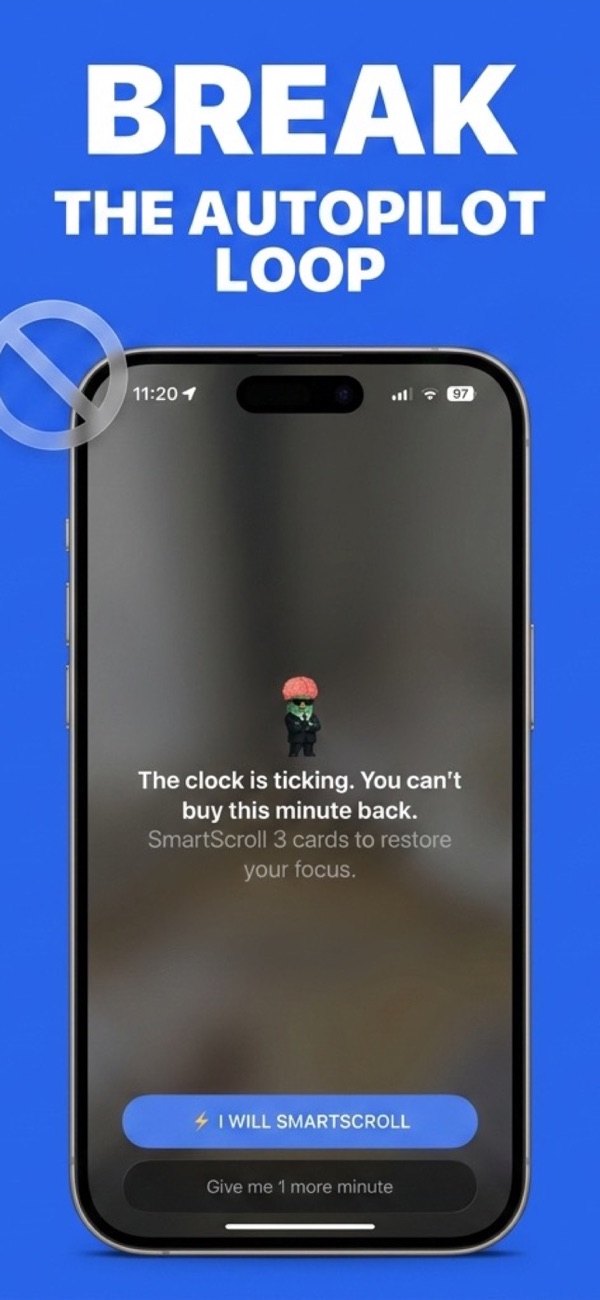
- The trance breaks first. Instead of a dismissible banner floating over a still-playing feed, the loop stops: "The clock is ticking. You can't buy this minute back." Deciding whether to continue happens outside the feed, not inside it.
- The craving gets an offer, not a wall. Three knowledge cards, same swipe gesture, actual content. The urge discharges into the redirect, which is why there's dramatically less pressure on the override than the Ignore button faces.
- The reason stays visible. The Life Grid shows what the habit costs in years of remaining life. Sunday-you's reasoning is present at Tuesday-you's moment of temptation, which is the entire two-selves problem, solved.
There is still a conscious "1 more minute" choice, by design: the goal is making continuation a decision rather than a reflex. Decisions last a minute. Reflexes scroll for hours.
Quick test of which system you need: count your Ignore taps this week (Screen Time → See All Activity shows limit usage). Zero to two: Apple's limits with the passcode trick may be enough. Daily: the wall model has already lost, and more wall won't win it back. Switch mechanisms, not numbers.
Setting limits that survive
Whatever tool enforces it, the limit itself matters: set it at roughly half your current usage, not at an aspirational 15 minutes that guarantees daily failure, and pair it with schedules for the morning and the night window, where most ignoring happens. Then tighten once, after two weeks, when the reflex is already weaker. The full framework is in how to reduce screen time on iPhone.
Stop negotiating with the Ignore button
Download SmartScroll and set a limit that meets the craving with something better.